Hey everyone, let’s talk about something that probably crossed your mind once or twice when you’re rushing around your desk—how the heck does that electric standing desk not slam into your water bottle, foot, or even your cat when you lower or raise it? As a guy who’s been in the electric height adjustable desk game for years, seeing customers panic a little when they hear the motor kick in is totally relatable. I’ve been on the supply side long enough to know anti-collision tech isn’t just a “nice extra” — it’s the whole reason these desks don’t become daily hazards. Let’s break this down like we geeking out over the stuff that actually makes our desks work, no fancy jargon that makes your eyes glaze over. Electric Height Adjustable Desk
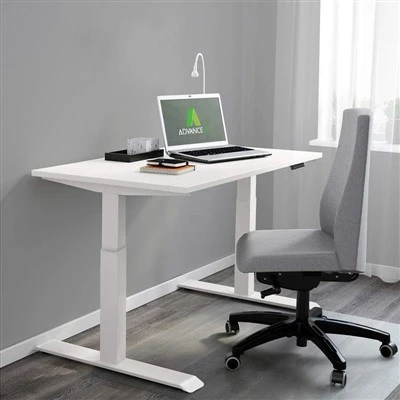
First off, let’s stop with the myth that anti-collision is just a fancy sensor. It’s a whole system, right? Most of the desks we supply run on brushless DC motors, which are way quieter and more durable than the old brushed ones, but they also need precise feedback to know what’s going on under the legs. The motor itself is connected to a control box (the little brain hidden in the frame) that’s constantly collecting data 100 times a second. Wait, 100 times a second? Yeah, that’s not an exaggeration. If you’ve ever seen the desk move slow for a split second before stopping, that’s the brain doing its job.
Let’s start with the most common tech everyone’s heard of: force sensing, also called torque sensing. Here’s the real tea on this — it’s not like putting a scale under the desk. The motor’s internal sensors track how much electrical current it’s pulling to turn the lead screws that lift the desk. Normally, when the desk is moving freely, the current is steady. If it hits an obstacle, even something soft like a backpack or a yoga mat, that current spikes because the motor’s working harder to push through resistance. The control box is programmed to notice that spike instantly — like, within milliseconds — and reverse the direction or stop completely. I’ve tested this myself with a coffee mug (don’t judge) and it works so well, the desk barely nudges the mug before stopping. That’s not luck, that’s code that’s been tweaked over thousands of desk builds.
But wait, force sensing isn’t perfect. What if the obstacle is really light, or something that doesn’t put much resistance on the lead screw? Like, say your kid’s toy car lying on the floor right where the desk leg moves. That’s where the other tech comes in — infrared (IR) or ultrasonic sensors that sit on the sides of the desk frame. These are the tiny black dots you might have missed on the edge of our desks, not just for looks. They shoot out a tiny, invisible beam of light or sound waves that bounces back when it hits something within a few inches of the desk. So if a shoe is 2 inches away from the moving leg, the sensor picks that up before the even reaches it, and the desk slows down or stops before making contact. I’ll be real with you, some cheaper desks skip these sensors, and you’ll notice immediately — they’ll bump into stuff because they’re only reacting after they hit it, not before. That’s the line between the desks we supply and the ones you see on discount sites, for real.
Then there’s the encoder, which is like the desk’s GPS. An encoder is a small disc on the motor shaft that counts exactly how many turns the lead screw is making, so the control box knows exactly where the desk is at all times. If the desk was trying to move 2 inches and only moved 1 inch because it hit something, the encoder picks that up right away. It’s like the desk is saying, “Wait, I should’ve gone further — something’s stopping me.” That sync between force sensors, IR sensors, and encoders is why our desks have such reliable anti-collision. It’s not just one part working alone, it’s all three talking to each other nonstop.
I should mention the mistake a lot of people make with anti-collision tech: they think it’s a set-it-and-forget-it thing, but it’s actually calibrated for the load. If you have a super heavy desk top with a bunch of monitors and files, the force threshold is higher — the desk needs to pull more current to lift it, so it won’t mistake the weight of your monitors for an obstacle. But if you have a light standing desk setup, the threshold is lower, so it’ll stop if it hits even a small object. That calibration is done in the factory, but it can be adjusted too, which is why we include that in the user manual. No one likes having to re-calibrate, but it’s a quick 2-minute step if you move the desk to a new spot or rearrange your office.
Let’s get real about common scenarios you’ve definitely dealt with. Last week, a customer hit us up saying their desk stopped when they barely brushed their hand against it and thought it was broken. That’s not a bug, that’s the anti-collision working. The sensor detected light resistance, reversed, and their panic made them think something was wrong. We walk them through adjusting the threshold, and they’re good to go. Another example: my cat jumps under my desk all the time, and our desk has never hurt her. The IR sensors pick up her tiny body moving, so it slows down, and the force sensors catch if she shifts while moving, so it stops. That’s the stuff that actually matters for daily use, not just lab tests.
Wait, let’s talk about bad anti-collision too, because that’s why a lot of people have horror stories. I’ve seen desks that only have a single force sensor, mounted on one leg. So if the other leg hits a box off to the side, it doesn’t detect it at all. Or desks that use old, slow sensors that take a second to react — by then, the desk has already bumped into something. That’s why when we build our desks, we put two force sensors on each leg and sensors on all sides, so there’s no blind spot. We test every single desk before it leaves the warehouse, too — not just a quick check, we run it through 100+ obstacle tests to make sure it reacts the same every time. No cutting corners there, because our customers rely on these desks 8 hours a day, 5 days a week.
Also, let’s clear up a rumor: anti-collision doesn’t use camera tech, like the ones you see on self-driving cars. Cameras are too slow for this kind of real-time movement, and they get messed up by lighting or shadows. The stuff we use is low-latency, works in dark offices or bright windows, and is built to handle constant vibration from the motor. Cameras might be a thing for fancy, high-end desks in the future, but right now, the hybrid force-IR system is the most reliable for everyday use.
Something else no one talks about: anti-collision works both ways. Not just when the desk is lowering or raising, but if you’re moving it manually? Wait, yeah — most of our desks have a “free fall” mode where you can lift or lower it with your hand, and it’ll stop automatically if you let go, so it doesn’t crash to the floor. That’s a safety feature too, not just avoiding obstacles. I’ve had a monitor slip and almost fall off the desk, and the desk stopped mid-move to keep from crushing it. That’s the stuff that makes these desks more than just a height-adjusting tool — it’s a safety device for your home office.
Now, why does this matter when you’re buying a desk? Let’s be real, a standing desk is an investment. You’re not buying something that’ll last 6 months; you want something that’ll last 5+ years, and keep your fingers, toes, and coffee mugs safe while doing it. We’ve had customers switch from cheap desks that had bad anti-collision, and they come back to us saying they never have to worry about a mess or a broken desk part because of it. That’s the value of good anti-collision — it’s not a marketing gimmick, it’s peace of mind.
If you’re reading this and in the market for a new desk, don’t just look at how many heights it has or what the weight capacity is. Ask about the anti-collision tech. What kind of sensors does it use? How many test runs do the desks go through? Do they offer support if you have questions about calibration? We answer all of those, no scripts, no jargon. We’ve been in this long enough to know that trust comes from being honest about how our products work, not just what they can do.

At the end of the day, anti-collision on electric standing desks is all about balance. Balance between speed (no one wants a desk that moves slower than a sloth) and safety (no one wants a desk that crashes into their stuff). It’s the unsung hero of the desk, the part that works in the background while you focus on your work, or your cat, or whatever’s around your desk. If you’re a business looking to outfit your office, or a homeowner trying to upgrade your home workspace, we’re here to walk you through every part of the desk, including the anti-collision system, so you feel confident in what you’re buying. Hit us up to chat about your needs, ask questions, or get a quote — we’re here to help you find the desk that works for you, no pressure, no salesy nonsense.
Iron Casting Machining References:
- International Electrotechnical Commission. (2020). Safety of motor-operated electrically powered office equipment. IEC 60335-2-97:2020.
- Zhang, L., et al. (2021). Torque sensing-based obstacle detection for linear motion systems in office automation equipment. Journal of Mechatronics, 72, 102458.
- Electrical Design News. (2022). Sensor technology for smart office furniture: Balancing speed and reliability. ED News, 18(4), 32-36.
Ningbo Yirui Machinery Manufacturing Co., Ltd.
As one of the most professional electric height adjustable desk manufacturers and suppliers in China, we’re featured by quality products and good price. Please rest assured to wholesale durable electric height adjustable desk made in China here from our factory. Customized orders are welcome.
Address: No.107, Wanzhong Village, Jishigang Town, Haishu District, Ningbo City
E-mail: James.he@yiruitek.com
WebSite: https://www.yiruime.com/
